Intelligent Resonance Suppressor
ResoTame
Harshness, ringing, mud, boxiness and sibilance are narrow problems, and a static EQ notch is a permanent answer to a temporary one. ResoTame listens to the spectrum continuously and reduces only what misbehaves, only while it misbehaves.
Hundreds of fast, self-adjusting spectral filters, steered by a detector you can teach in eight seconds. Tone and transient protection keep the performance intact, and loudness-matched monitoring means every comparison you make is about tone, not volume.
Coming soon • VST3 / AU / AAX • Windows & Mac
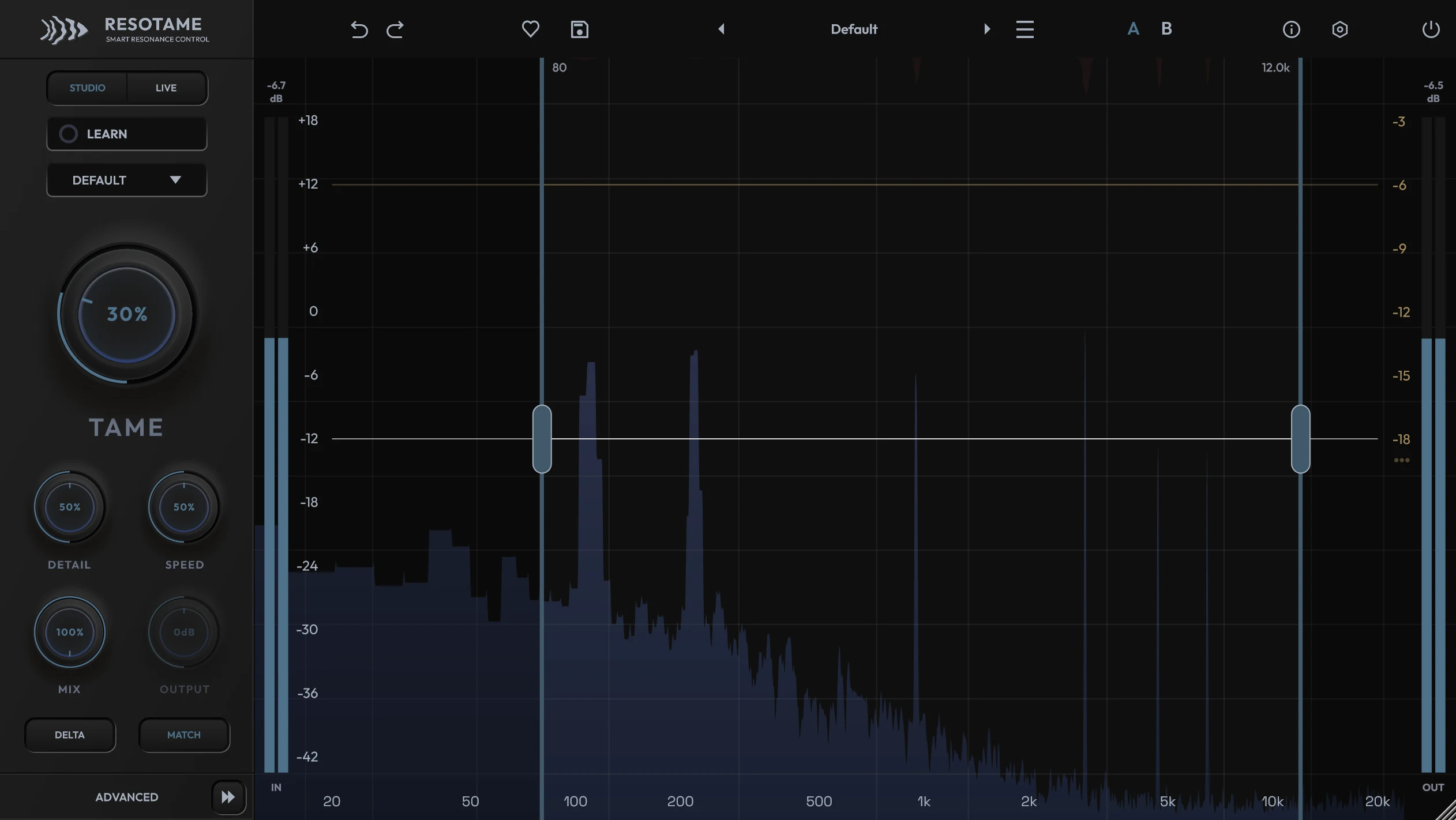
Visualized
Resonance control in motion
The detector scores every frequency against its spectral neighbourhood, converts those scores into per-frequency gain, and stops at the ceiling you set. Delta lets you hear the result of that on its own: rings and fizz, not the instrument.
What It Does
Stop hunting problem frequencies by hand
Set how much smoothing you want and ResoTame decides where, when and by how much to act. Because the processing only touches the parts of the spectrum that misbehave, the result stays cleaner and more transparent than the static cuts you would otherwise leave in place.
It is a corrective tool, not a parametric EQ, a fixed-band de-esser or a loudness maximiser. It removes what should not be there and leaves the rest alone.
One Knob That Means Something
TAME scales the whole engine at once: detection sensitivity, how early reduction starts, and how hard it digs in. On most sources it is the only control you touch.
Learn From Your Own Audio
Press LEARN and play a representative section. Eight seconds later ResoTame has placed focus points on the strongest resonances it found and narrowed the detection range around them, all as one undo step.
Six Detector Modes
Default, Vocal, Instrument, Drums, Mix and Hard re-bias what the engine listens for and what it protects, without moving a single one of your knob positions.
Max Cut Ceiling
A hard limit, 1 to 18 dB, on how deep any single spectral filter may reduce. The reduction overlay visibly flattens against it, so over-processing is something you can see.
Musical Protection
Tone Protect shields fundamentals, overtone series and vocal formants. Transients Protect relaxes reduction while attacks pass, so hits and consonants stay punchy.
Honest Comparisons
Delta monitors only what is removed. Loudness Match compensates the level the cleanup costs, so an A/B tells you whether the track got better, not whether it got louder.
The Graph
Everything the detector is doing, on one screen
The blue spectrum is the processed output. The red overlay descending from the top is the current gain reduction per frequency. Notches reaching down show where ResoTame is working right now. Dimmed regions sit outside the detection range and are ignored entirely.
Drag the range handles to decide where the detector is allowed to act, or right-click for task presets: Sibilance, Mud / Box, Cymbal Fizz, Snare Ring, Mix Polish. Up to four independent ranges can be live at once, so you can tame low-mid cloud and high sibilance while leaving the presence region untouched.
Double-click anywhere to add a focus point. Push it up to make the detector more eager there, pull it down to shield the area, scroll to set its width, and use its headphone icon to solo a bandpass at that frequency so you can hunt the resonance by ear while you drag.
Controls
Five knobs, and only one you usually move
Every control is automatable and every one has a plain-language tooltip in the plugin. These are the ranges as they ship.
Tame (0 to 100 %)
The main amount. 20–40 % polishes, 50–70 % is committed cleanup, beyond that is a firm clamp for problem sources.
Detail (0 to 100 %)
Broad to surgical. Low values smooth wide build-ups, high values snipe needle-like peaks and leave the surrounding spectrum alone.
Speed (0 to 100 %)
How fast the reduction filters move. Slow breathes with the material; fast clamps consonants, cymbal hits and plucks.
Mix (0 to 100 %)
Latency-aligned dry/wet, so any blend stays phase-coherent. Lower values give parallel-style taming with the original body preserved.
Output (±12 dB)
Manual level trim after processing. Dimmed while Loudness Match is doing the job for you.
Max Cut (1 to 18 dB)
The reduction ceiling. Mixes and masters usually want 2–4 dB, single tracks 5–9 dB, rescue jobs more.
Workflow
Built for the jobs that keep coming back
Harsh vocals and bright mics
Vocal mode, LEARN on a busy phrase, TAME to roughly 35–55 %. Check in Delta: you should hear harshness and sibilance leaving, not vowels.
Ringing snares and fizzy cymbals
Drums mode keeps the attacks intact while rings and fizz between hits are tamed. The Cymbal Fizz and Snare Ring range presets get you there in one right-click.
Buses and masters
Mix mode lowers the ceiling and slows the engine. Keep Max Cut around 2–4 dB and TAME at 15–30 %; the mix should sound calmer, not smaller.
Unmasking with the sidechain
Route the lead vocal into a ResoTame on the guitar bus and the guitars dip precisely where the vocal's resonant energy needs room, without an overall volume dip.
Tracking and stage work
The Live engine runs at 1024 samples on the Light grade. Save As Default can switch every instance in the session to it at once.
Podcast and dialogue cleanup
Room ring on untreated spaces, boxy laptop mics and sibilant speech all respond to a narrow detection range and a moderate TAME.
Tech Specs
Two engines, four grades, reported latency
Studio is a three-band multi-resolution engine: long analysis windows in the lows to resolve room modes and bass ring, short windows in the highs to keep transients crisp. Live is a single-window engine tuned for low latency. Switching between them is crossfaded, so it never clicks.
Studio Engine
Pro: 4096 smp ≈ 93 ms @ 44.1 kHz
Ultra: 8192 smp ≈ 186 ms
~6 % CPU per stereo instance
Live Engine
Light: 1024 smp ≈ 23 ms @ 44.1 kHz
Normal: 2048 smp ≈ 46 ms
~2.7 % CPU per stereo instance
Operating Systems
macOS 10.15+ (Apple Silicon & Intel)
Windows 10 (64-bit)
Formats
VST3 and AAX on Windows.
VST3, AU and AAX on macOS.
Mono and stereo processing.
Stereo Handling
Linked, Dual or Mid-Side. Linked shares one reduction driven by the louder channel, so the image never shifts.
Presets & Interface
46 task-named factory presets, A/B snapshots, full undo history, resizable 50–200 % with an optional tooltip bar.
FAQ
Common questions
Is ResoTame a dynamic EQ or a de-esser?
Neither. A dynamic EQ and a de-esser both need you to choose the bands. ResoTame runs hundreds of self-adjusting spectral filters and decides where, when and how much to act on its own, with Max Cut as a hard ceiling on any single reduction.
Will it flatten the character of the source?
That is what Tone Protect, Transients Protect and Max Cut are for. Judge it in Delta: you should hear rings, fizz and harsh peaks, not the whole instrument.
Does it add latency?
Yes, and it reports it, so your DAW compensates. Use Studio while mixing and Live whenever you are listening through the plugin in real time: the Live engine runs at 1024 samples, about 23 ms at 44.1 kHz, on the Light grade, and switching engines is crossfaded so it never clicks.
What does Learn actually change?
It places up to three focus points on the most prominent stable resonances and narrows the detection range around them. It never moves TAME or any other knob.
Can I use it on a master?
Yes, Mix mode exists for it. Keep Max Cut low and TAME modest, and leave Loudness Match on so the bypass comparison stays fair.
Can I activate it offline?
Yes. Create a device file on the studio machine, exchange it for an access file on any internet-connected device, and drop that back on the plugin.
Updates
Changelog
Track the latest improvements and fixes.
Version 1.0.0
- Initial Release
Join the community
Stay in the loop
Learn about new plugins, limited drops, and discount codes before anyone else.